Sticker Notes: A Playful Dingbat Font for Creative Designers
Imagine adding a burst of colorful, tangible charm to your digital projects with just a single keystroke. That’s the creative promise of Sticker Notes, a unique dingbat font designed to inject personality and visual interest into a wide range of design work.
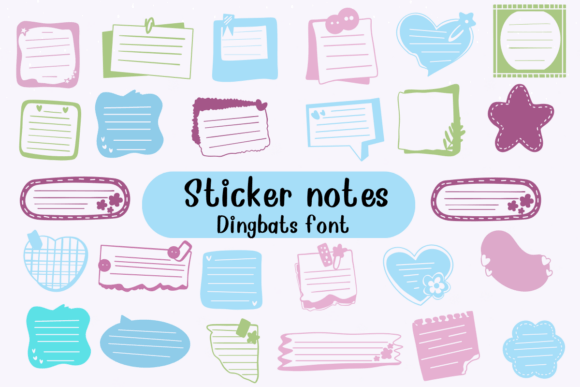
This isn't your typical serif font or sans serif font. Sticker Notes is a dedicated display font where each character on your keyboard translates into a different, vibrantly colored sticky note shape. Think of it as a versatile design asset, ready to be deployed for instant visual impact. Its playful nature makes it an excellent choice for projects that aim to feel approachable, fun, and modern.
Where Can You Use This Creative Font?
The applications for this typeface are limited only by your imagination. It excels in scenarios where you need to draw attention or convey a sense of organization and brainstorming. Consider using it for:
- Social Media Graphics: Create eye-catching Instagram stories, Pinterest pins, or Facebook posts. Use the notes as backgrounds for short text or as decorative accents around your main message.
- Logo Design & Brand Identity: For brands targeting a youthful, creative, or educational audience, this font can be a cornerstone of a memorable logo or a recurring graphic element in brand guidelines.
- Poster & Invitation Design: Perfect for event posters, party invitations, or workshop announcements where a casual, energetic vibe is desired. It adds a layer of tactile fun that standard fonts cannot.
- Packaging Design: Ideal for products like stationery, planners, kids' crafts, or gourmet snacks. It helps packaging stand out on the shelf by communicating creativity and approachability.
- Web Design & Editorial Layouts: Use it for section dividers, call-to-action buttons, or highlight boxes in blogs and digital magazines to break up text and guide the reader's eye.
Tips for Choosing and Using Sticker Notes
While this font is a powerful tool, using it effectively requires some thought. Here’s how to make the most of it:
Test for Readability and Mood: Always preview the font in context. The shapes are decorative, so they work best for headlines, logos, or accent elements rather than long paragraphs of body copy. Ensure the playful mood aligns with your project's overall tone.
Master Font Pairing: This is key. Pair Sticker Notes with a clean, neutral typeface to create balance. A simple sans serif font for body text or a elegant script font for a contrasting headline can make the dingbat characters pop without overwhelming the design. Good font pairing is a hallmark of professional typography.
Check the License: Before downloading, verify the license. If you're using it for commercial projects like client work or merchandise, you'll need a commercial font license. Always read the terms to ensure it fits your intended use, whether for personal projects or professional design assets.
Explore Its Flexibility: Experiment with color. Since each character is a separate shape, you can change the color of individual notes in your design software to create custom patterns, color-coded systems, or themed graphics.
The right typeface does more than display words; it shapes perception and enhances brand recognition. A well-chosen font like this one can elevate a design from ordinary to memorable, providing that crucial creative flair that captures attention. By thoughtfully integrating it into your toolkit, you can add a polished, professional, and undeniably fun dimension to your visual projects.